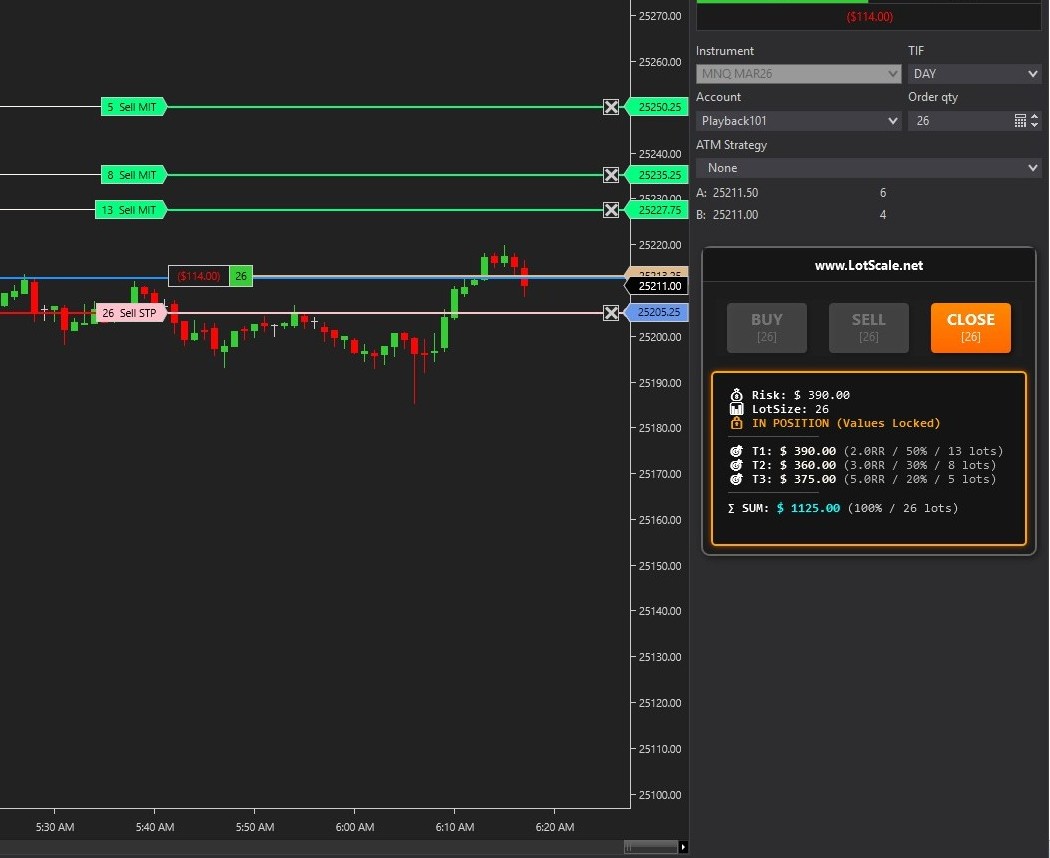
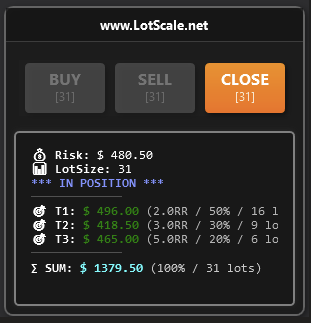
Automatic position sizing + multi-target management for NinjaTrader 8. Eliminate calculation errors and trade with confidence.
Professional risk management at your fingertips
Professional-grade risk management built directly into your NinjaTrader 8 charts
Calculate lot size based on fixed dollar risk (e.g., $500 per trade) or configure it by Points (e.g., 25 points per trade). Real-time updates as you drag the Stop Loss line on chart. Works on any futures instrument.
Draggable red horizontal line on chart. Move it with mouse for instant lot size recalculation. Visual feedback in real-time. Freezes when position is open to prevent accidents.
Automatic MIT orders created on entry. Fully configurable targets (T1/T2/T3) with custom percentages and RR ratios. Example: 50% @ 2.0R, 30% @ 3.0R, 20% @ 5.0R.
BUY button: Long entry + auto SL + targets. SELL button: Short entry + auto SL + targets. CLOSE button: Instant position close + cancel all orders. Simple and fast.
Native integration with NT8 ChartTrader panel. Professional gradient buttons. Real-time lot size display on buttons. Responsive design adapts to chart size.
Min/Max lot size limits prevent accidents. Zero lot protection disables buttons if risk too high. Partial fill handling auto-updates SL. Frozen line system prevents changes during position.
No more manual calculations. Just drag, click, and trade.
Configure your fixed dollar risk (e.g., $500) or configure it by Points (e.g., 25 points). This stays consistent across all trades, enforcing disciplined risk management automatically.
Place the interactive red line at your desired stop loss level by Drag and Drop. LotScale instantly calculates the perfect lot size based on your set risk and the distance to current price.
One click executes your entry order with the calculated lot size. LotScale automatically places your stop loss and all profit targets simultaneously.
As targets fill (T1, T2, T3), LotScale automatically updates your stop loss for the remaining position. Set it and forget it. With Close button you can Exit anytime.
Choose the plan that works for you. Both include all features and 4-day free trial.
Perfect to minimize your monthly cost however let LotScale manages your Risk!
Best value for serious traders committed to consistent results
One prevented $10,000 fat-finger error = 670+ months of LotScale
Yes! LotScale works perfectly on Simulation accounts. We highly recommend testing thoroughly on Sim before going live. All features function identically on Sim and Live accounts. You need to have data connection to have LotScale works.
Absolutely! LotScale automatically detects tick values for any futures instrument in NinjaTrader 8: ES, MES, NQ, MNQ, RTY, M2K, CL, MCL, GC, MGC, YM, MYM, and more. No manual configuration needed.
No - actually you need to ENABLE ChartTrader! LotScale integrates directly with the ChartTrader panel. Use ONLY LotScale's buttons to avoid order conflicts. Don't use the native NT8 order entry buttons while LotScale is active.
One license is valid for one computer/installation. If you need LotScale on multiple machines, you'll need a separate subscription for each. This ensures optimal performance and licensing compliance. Please reach out to our Customer Service colleagues: Support
LotScale requires NinjaTrader 8 (version 8.0.0.0 or higher) on Windows 10/11 64-bit. It does not work with NinjaTrader 7 or earlier versions. Make sure your NT8 is up to date for best results.
After purchase, you'll receive a mail with all the steps you need to have a quick installation. It is easy, do not worry!
Yes, fully customizable! You can configure 0-3 targets with any percentage allocation and risk/reward ratio you prefer. Example: 60% @ 1.5R, 40% @ 4.0R, or any other combination that fits your trading style.
Email support is included with your subscription. Contact us at Support and we'll help you troubleshoot any issues. We typically respond within 24 hours on business days.
Join traders who eliminated calculation errors and trade with disciplined risk management
Cancel anytime • Email support included